Apple HomeView Early Reviews: Kitchen Convenience Meets Software Friction
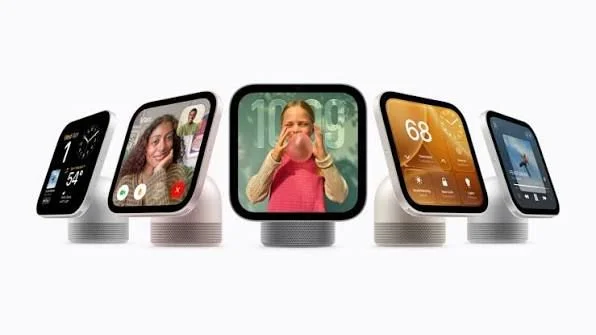
Apple HomeView’s early appeal comes down to a practical question: can a shared screen handle small household tasks without sending everyone back to their phones? Owners posting in three Reddit discussions describe a useful kitchen companion for calls, music, recipes and home controls. They also report friction with timers, connectivity and widgets. My read is that HomeView’s value depends less on how many things it can display than on whether its everyday jobs work consistently.
Apple launched HomeView on November 13, pitching it around music, FaceTime and home management. A few days later, early owners were already judging it against the routines they wanted to move onto a dedicated screen. The comments offer a snapshot from a small set of discussions, not a representative survey, and the accounts and reported problems haven’t been independently verified.
A shared screen earns its place through routine
For owners who are pleased with HomeView, the case for it is straightforward: it keeps common tasks in a shared space. One commenter, u/mirinjesse, called it a replacement for “my phone + HomePod in the kitchen,” citing calls, timers, recipes, music and HomeKit controls. That’s a specific job description, not a demand for a general purpose tablet.
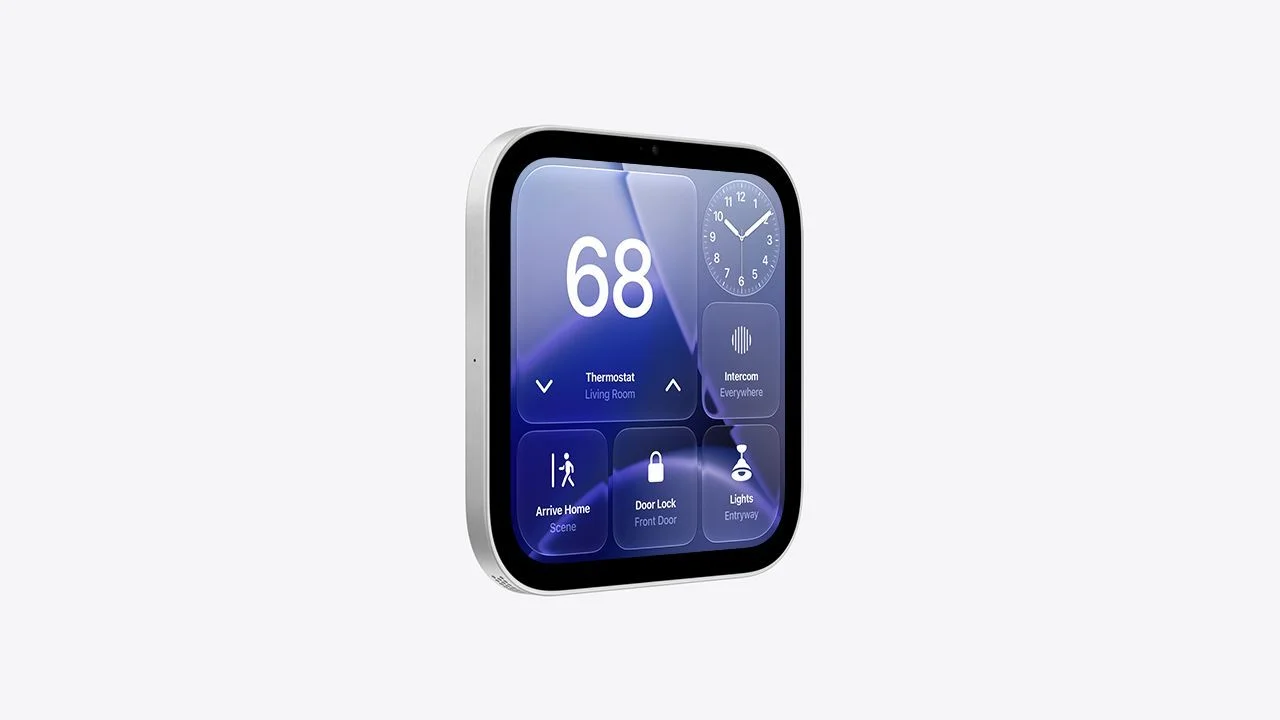
Another owner, u/Internal-Pomelo757, likes that children can FaceTime their grandparents from the kitchen without borrowing a parent’s phone. Recipes, visual timers and music also feature in that person’s use. A separate commenter, u/chente08, describes a broader control point for doorbell video, notifications, thermostats, smart lights and a nursery camera, as well as a photo display.
These comments appeared in a largely critical discussion, which makes the range of uses notable. Even the thread’s dissatisfied original poster said calls and timers worked. A home screen that gets used for a minute at a time may still be worthwhile if it reliably handles the moments when someone needs it. The small but recurring nature of those tasks also leaves little room for a device to stumble: people expect a timer to start when asked.
Basic reliability shapes the experience
That expectation helps explain why a timer complaint can outweigh requests for more entertainment apps. In another discussion, u/snowace56 wrote, “The fact that I can’t set a timer with Siri is really annoying.” Yet a reply in the same thread points to a different experience: u/MBSMD said their unit had arrived the previous day and they weren’t seeing that issue, while acknowledging there could be bugs.
Other reports add to the uncertainty. u/bizzarefoods said HomeView couldn’t stay connected to their phone and repeatedly required both devices to use the same network. In the timer discussion, the original poster also reported that faces disappeared after a reboot and that Siri later had connection problems.
Those accounts don’t establish how widespread the faults are or what causes the difference between owners’ experiences. They do show why reliability is central to HomeView’s pitch. A request for additional apps is a question about scope; a timer or connection problem interrupts the routine the device is meant to simplify.
The iPhone remains part of the equation
HomeView is also being judged by how much work it can take off the iPhone. Some owners want a device the family can use independently. Others find that the screen’s widgets still send them back to the phone. u/FewPipe816 questioned why widgets available to place on HomeView’s screen would then show as “only available on iPhone.” The same commenter praised its music and recipe modes and said they were happy with the device.
For u/GiggleyDuff, phone dependence gets in the way of a particular household setup: playing Spotify for the children on HomeView while watching YouTube on a phone with AirPods. That comment describes one user’s desired arrangement, rather than proving how the system behaves across every configuration. Still, it captures the broader test: can the household screen keep doing its job while its owner uses a phone for something else?
That distinction matters for anyone expecting HomeView to function like an iPad mounted in the kitchen. TechRadar’s Cat Ellis reports that the device doesn’t provide unrestricted App Store access. Limited app choice may be an acceptable tradeoff for someone focused on home controls and calls. It’s a different proposition for a buyer expecting a flexible tablet.
Owners disagree on how much patience to give it
Reports about the interface show a similar split. One detailed owner post praised live camera previews, music controls and Handoff, while criticizing widget rearrangement and volume adjustment. Despite those irritations, u/idealdreams said, “All in all, I would buy again.” Another participant, u/Extreme-Nerve3029, described feeling like a beta tester and said they planned to return the unit. u/JoelMDM summed up a more skeptical view of possible future fixes: “‘Potential’ is worthless unless it’s free.”
These reactions aren’t contradictory so much as personal thresholds. Someone who regularly uses camera previews, music and Handoff may tolerate awkward controls. Someone buying HomeView to replace a phone for basic household tasks may not. Liking the hardware or seeing promise in its features doesn’t erase the cost of working around software that isn’t behaving as expected.
Judge it by the jobs you have now
Early owner discussions can’t tell us how common the reported reliability issues are, whether different setups or software versions account for some of the variation, or whether later fixes have changed the experience. They do offer a useful way to evaluate the product: list the tasks you’d actually hand it. Calls with family, music while cooking, recipe viewing, doorbell checks and smart home controls appear in owners’ accounts. Then consider how often those routines would still require your iPhone and whether HomeView’s current app and widget options fit your needs.
The practical question isn’t whether HomeView has potential. Some owners already find it useful, while others see too much friction. It’s whether the screen reliably saves effort in your home today. For a device built around short, repeated interactions, that answer will depend on everyday software details as much as the features on its display.