LLM Inference Optimization: Choose the Right Technique for Your Workload
Choosing an LLM Inference Optimization Technique: A Decision-Tree Approach
Bala Priya C · November 3, 2026 · Language Models
The biggest mistake in LLM inference tuning is reaching for a familiar optimization before finding the bottleneck. A smaller model won’t fix wasted GPU time from uneven request lengths; more efficient batching won’t help if the model barely fits in memory. The right choice depends on the model and traffic you actually have.
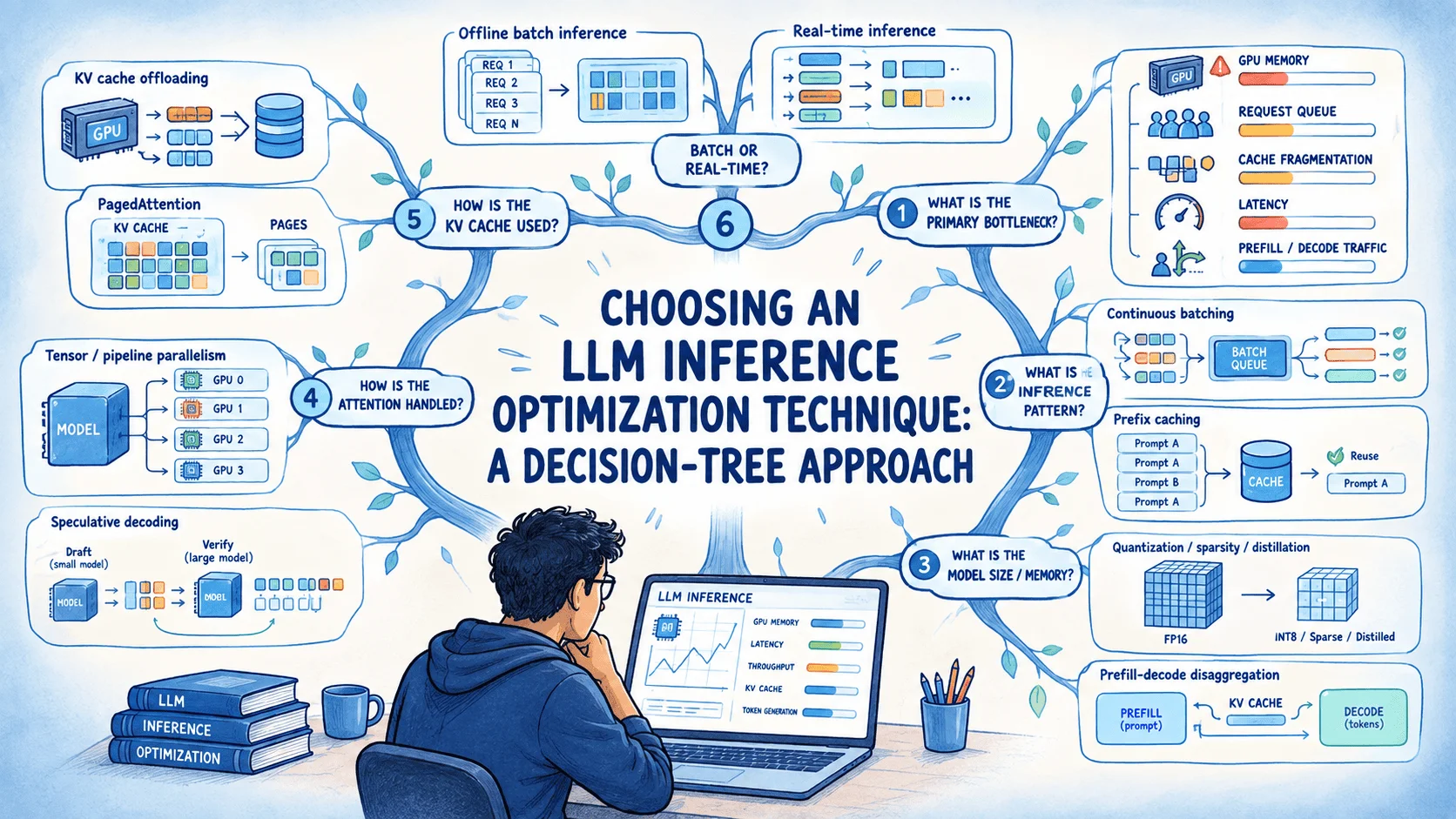
This guide uses six questions to connect those workload details to an optimization technique. It covers what each option assumes, the trade-offs you’ll face, and the symptoms that suggest your first choice isn’t helping. The point is to make the selection process concrete: observe the workload, identify the limiting resource, and test whether the proposed technique changes that constraint.
Start with the bottleneck
As LLM traffic grows, requests can queue behind long generations, attention’s key-value (KV) cache can consume GPU memory, and generation can spend much of its time waiting on memory reads. Inference optimization covers techniques aimed at different parts of this problem: memory use, computation, and the way requests share hardware. Those constraints interact, but they aren’t interchangeable. A change that reduces memory pressure may make room for more concurrent requests, while a change to decoding may primarily affect how quickly each request produces tokens.
That distinction matters. Each technique works best under particular workload conditions, so tuning is less a checklist than a diagnosis. The decision tree below starts with the model and then considers prompt reuse, concurrency, cache memory, latency goals, and serving scale. Those questions matter because an inference service handles a mix of prompt processing and token generation, and each stage can put different pressure on the hardware.
Here’s the basic premise: first identify what is constraining your workload, then choose the technique designed for that constraint. A useful baseline should include both system behavior and user-facing outcomes. If memory use falls but latency rises, for example, the change may still be a poor fit for the service’s goals.
When an optimization disappoints
Failed tuning attempts often reveal a mismatch between a technique’s assumptions and the workload. The symptoms below are diagnostic clues, not proof: inspect the serving configuration and profile the actual workload before changing several settings at once.
| What you see | Likely explanation | What to try |
|---|---|---|
| Repeated prompts barely register any prefix cache hits | Context serialization may be non-deterministic, or changing content may appear too early in the prompt. | Put stable material first and make serialized key ordering consistent. |
| Batch size stalls despite available memory | PagedAttention may be off, or its page size may be set incorrectly. | Inspect the serving engine’s batching and cache settings directly; don’t assume the defaults are enabled or suitable. |
| Speculative decoding runs slower than ordinary decoding | The draft model may not win enough acceptance from the target model. | Choose a draft model whose behavior is closer to the target, or disable speculation for this workload. |
| Disaggregation increases latency | The workload may be too small, or dominated by short requests that benefit from local, cache-heavy processing. | Return to local prefill and set a traffic threshold for reconsidering disaggregation. |
| Quantization brings no throughput gain | Weights may be quantized while activations remain full precision, with the GPU converting them back before compute. | Profile the workload to find where time goes before expecting quantization alone to improve throughput. |
When an optimization repeatedly falls short, revisit the assumption behind it before adding another layer of complexity. One setting can mask another: a batching change may alter memory pressure, while quantization can shift where time is spent. Change a limited set of variables, then compare the same workload against the same baseline. Otherwise, it’s hard to tell whether the technique helped or another adjustment did.
Choose for the bottleneck
The useful question isn’t which inference technique is best in general; it’s what is limiting your system. Model size, prompt overlap, concurrent traffic, memory fragmentation, and the tradeoff between throughput and per-user latency all point to different choices. Most deployments will need a small combination of techniques, tuned to their workload.
This is more significant than it looks: a service can report better aggregate throughput while individual users wait longer, or lower memory use without handling more useful work. If you’re working in this space, define what “better” means before tuning—whether that’s more requests served, shorter waits, or room for a larger model. The answer determines which trade-offs are acceptable. No single metric tells the whole story.
What the choice means over time
Inference workloads change as prompt patterns, request volumes, and model choices change. A configuration that suits repeated prompts may lose its advantage when those prompts become less consistent; a serving arrangement that helps at higher traffic may add overhead when demand is light. That’s why the decision tree should be treated as a way to revisit the diagnosis, not a one-time selection.
And this is the part most people overlook: optimization adds operational choices that need to stay visible. A cache policy, batching setting, or draft model can be sensible under one workload and counterproductive under another. Keep track of the symptom each change is meant to address and check whether that symptom actually moves. If it doesn’t, simplify and reassess.
Small, measured changes. Clear comparisons.
If you want a broader guide, The Roadmap to Mastering LLM Inference Optimization is a useful next read. It can help put these choices in context, but the decisive evidence still comes from the model and traffic you’re serving.
Happy learning!