Google Cloud Developer Plugin Brings Live Docs and Safety Controls to Antigravity
Cloud coding agents can write plausible commands that use outdated syntax, request the wrong permissions, or change a project before anyone’s reviewed the plan. The risk isn’t limited to a command that fails: an agent can make a technically valid change that has wider effects than the developer intended. Google’s new google-cloud-developer plugin for Antigravity addresses that gap with live documentation access and controls around cloud operations.
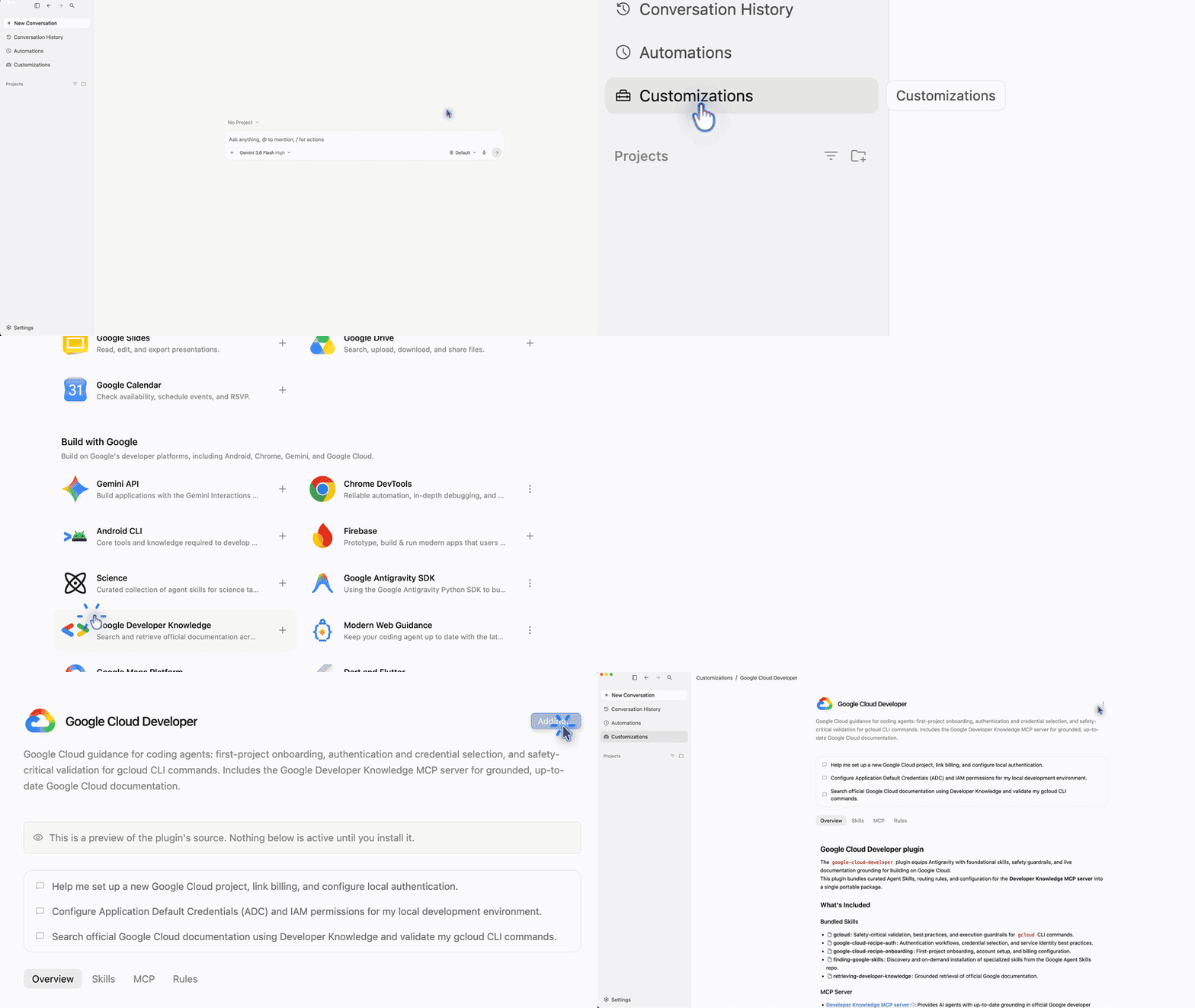
Available in Antigravity Marketplace’s Build with Google section, the plugin bundles agent skills, routing rules, and a pre-authorized Developer Knowledge MCP server. Installation requires no API key, OAuth exchange, or manual configuration: Antigravity handles authentication and connects the agent to Google’s developer documentation. That removes setup work, though it also means the agent’s access depends on how Antigravity manages that connection and what documentation the server can retrieve.
Documentation access with operational guardrails
The plugin’s practical value comes from pairing current technical guidance with checks on what an agent can do. It can query official documentation over streamable HTTP, inspect local settings such as existing CLI configurations, and map out an execution plan before running commands. These steps address two different failure points: the agent may misunderstand a service, or it may act on a mistaken understanding before a developer has a chance to intervene.
For cloud changes, the agent follows least-privilege IAM patterns and asks for consent before enabling billable APIs or modifying infrastructure. Its gcloud skill validates command syntax and blocks accidental destructive operations. That combination matters: documentation can help an agent choose the right command, while guardrails help keep execution under the developer’s control.
This is more significant than it looks. Cloud work often involves permissions, project state, and costs as well as code, so an answer that’s correct in isolation may still be a poor choice for a particular environment. The plugin’s checks can make that gap easier to catch, though they don’t remove the need to review the proposed plan and understand the effects of a change.
Skills load as tasks require them
Rather than loading a large catalog of specialized instructions into every session, the plugin uses routing rules to retrieve relevant skills when a prompt calls for them. The included google-cloud-discovery.md rule works with finding-google-skills to locate task-specific guidance in Google’s public skills repository. The design keeps the agent’s initial instructions focused, while leaving a path to more detailed guidance when a task needs it.
finding-google-skillsdiscovers and loads specialized skills on demand from thegoogle/skillsrepository on GitHub.retrieving-developer-knowledgegrounds answers and code samples in Google documentation covering Google Cloud, Firebase, Android, Web, and Gemini.gcloudchecks Google Cloud CLI syntax and applies execution safeguards.google-cloud-recipe-authsteers authentication toward service identities and Application Default Credentials, while discouraging service account JSON key downloads.google-cloud-recipe-onboardingguides project setup, account onboarding, and billing checks, auditing project state before service activation.
This on-demand model keeps specialized instructions out of the agent’s context until they’re relevant. The result should be a lighter default setup that can still call on deeper guidance for specific work. And this is the part most people overlook: routing is itself part of the system’s judgment. The agent has to recognize which skill applies before that skill can shape its answer.
Installation and a documentation query
Developers can install the plugin through the Antigravity Marketplace or run this terminal command:
agy plugin install google-cloud-developerThe CLI registers the bundled skills and connects the Developer Knowledge MCP server. The plugin and its skills are also available on GitHub. For Marketplace installation guidance, see the Antigravity documentation. For a developer, the short installation path lowers the barrier to trying the plugin, while the public repository offers a way to inspect the skills that inform its behavior.
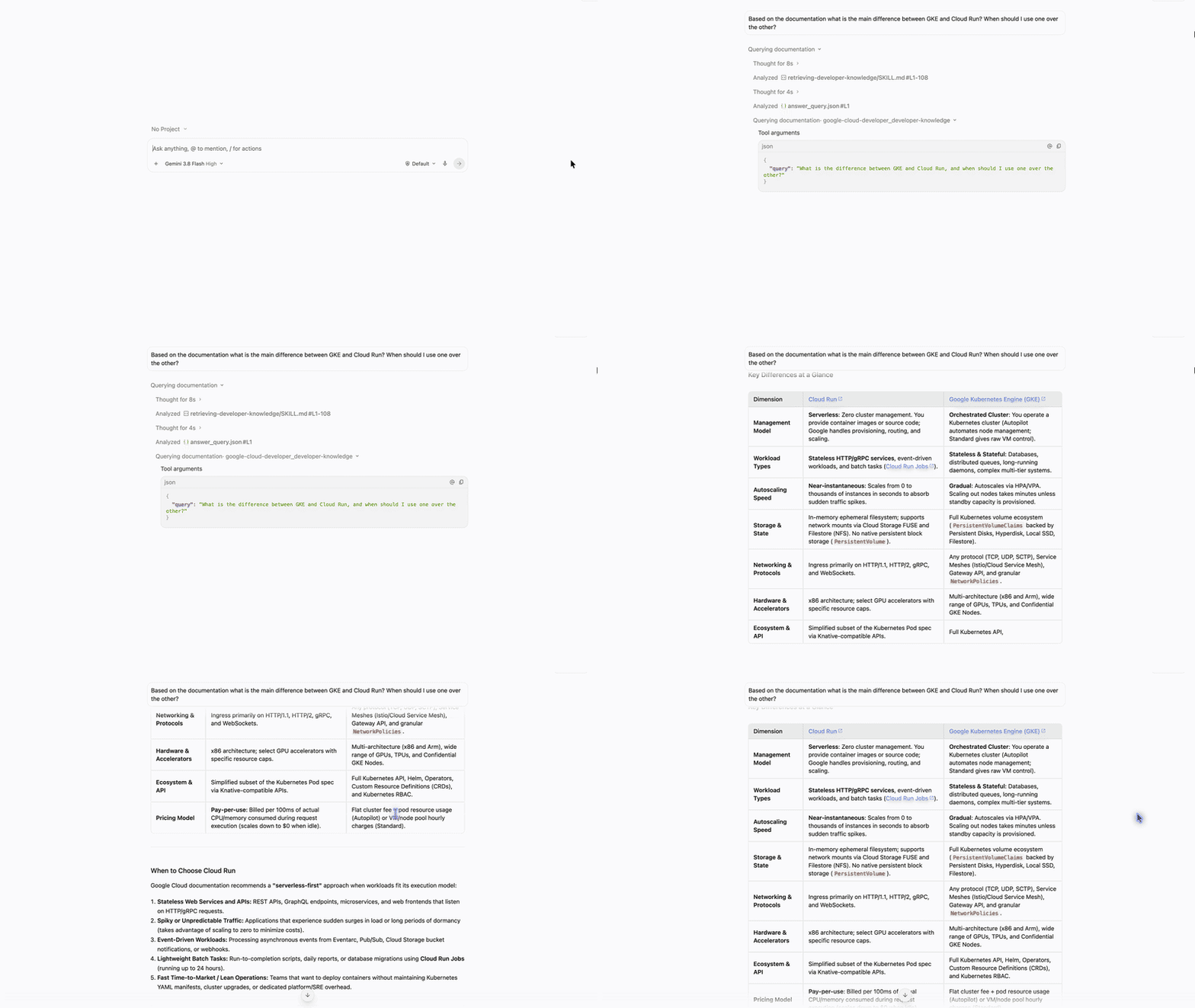
Once installed, the agent can use live documentation without a special prompt format. A developer might ask, “Based on the documentation what is the main difference between GKE and Cloud Run? When should I use one over the other?” The agent then queries the pre-authorized MCP server and builds its response from official sources.
That workflow changes the basis of the answer. Instead of relying only on what a model learned during training, the agent can consult documentation at the time of the request. The answer still needs judgment: documentation can explain product behavior, but the developer has to weigh that guidance against the needs and constraints of their project.
What it changes for cloud teams
For teams using coding agents on cloud projects, the useful shift is from relying on static model knowledge to grounding answers in current documentation, with explicit checks around commands and changes. That gives developers a clearer basis for reviewing an agent’s work before it reaches a project. If you’re working in this space, the distinction to watch is whether the agent explains its proposed action clearly enough for a person to judge it.
That said, a documentation connection is only one part of safe execution. The plugin describes consent checks and safeguards, but teams still need to understand the plans they approve and the permissions available in their environment. A validated command can be syntactically sound and still be inappropriate for the task. Better context. A more reviewable path from question to action.
The plugin’s promise is therefore practical rather than sweeping: it can make cloud guidance easier to retrieve and put friction around certain consequential operations. Whether that improves day-to-day work will depend on how well the agent selects relevant skills, how clearly it presents its plans, and whether developers keep review in the loop. Those are the parts that matter once installation is done.