Best Kindle Accessories for Comfortable Reading: Cases, Grips, and Page Turners
The Best Kindle Accessories I’ve Tested
A Kindle is easy to read on; making it feel like yours, or keeping it comfortable to hold for hours, takes a little more thought. The right case, grip, or remote can change how you use the e-reader, especially when you read for long stretches or want to settle into a position that’d be awkward with a bare device. I’m especially interested in accessories that let me put down my phone for a while. I’ve already got a holder for my phone; I don’t need to keep holding another screen, too. That preference shapes this guide: the point isn’t to add gear for its own sake, but to make reading more comfortable and personal.
For this guide, I tested accessories across every current Kindle model, including clear cases that can show off stickers, cases with straps, standalone grips, charms, and page-turning remotes. Those categories solve different problems. A case can protect the device and change how it feels in your hands; a grip can make it easier to hold; a remote can let you turn pages without touching the screen. If you’d rather not hold your Kindle while you read, a holder or remote may be the most useful upgrade. If you’re shopping for yourself or a book lover, the picks here cover both practical fixes and ways to add some personality—and can help you find the right e-reader accessories for the way you read. You could also consider them as gifts for readers.
One catch: Kindle sizes change between generations, so check that an accessory fits your exact model before buying. Most products in this guide were tested with 2024-generation Kindles, unless stated otherwise. A listing that says “Paperwhite” may still refer to a particular generation, so the model name alone might not settle the question. Check the product details against your device before you order.
Updated October 2026: I’ve added notes on the new Kindle Page Turn Case and Kindle Click, plus cases and grips from Bondi.
My Favorite Kindle Accessories
A Super Magnetic Case
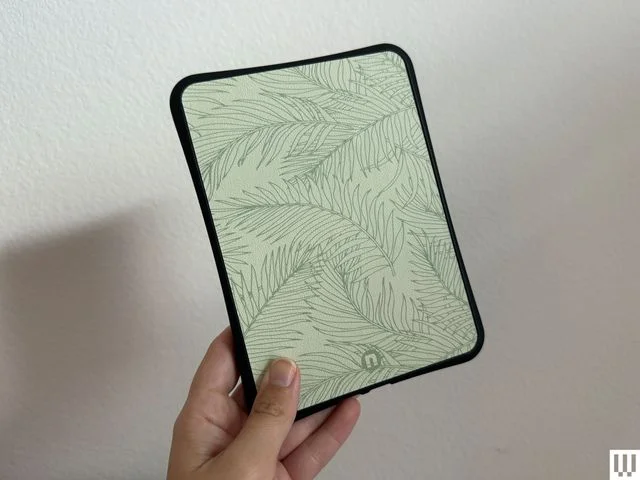
Bondi Kindle Paperwhite 12th Gen / Colorsoft Cases — $55. The Bondi case is available in multiple designs, including Zen Design and The Duck Pond Design; one listed design was reduced to $40 at the time shown. That choice of designs gives the case a more personal feel than a plain cover, while its magnetic construction is the feature to consider if you want a case that attaches without a more conventional fit. The lower listed price applies to one design, so check the current listing and selected option before buying.
Kindle Cases and Covers
A case does more than keep a Kindle from getting scratched: it can change how comfortable the reader is to hold. A thin cover may add little bulk, while a case with a strap can give your hand a different way to support the device. These picks have been tried on several Kindles, including the Kindle. That matters because an accessory can look right in a product photo and still feel wrong during an actual reading session.
The fit caveat matters. Testing was done on 2024 models, mainly the 7-inch Paperwhite and Colorsoft, and Amazon changed the dimensions slightly for its 2026 generation. Before buying a case or cover, check that it’s made for your specific Kindle model. A small size difference is enough to make an otherwise good accessory a poor fit. The practical consequence is simple: don’t rely on a familiar product name or an old review alone. Confirm the generation and size listed for the case you’re considering.
CoBak Clear Case
The CoBak case is a practical pick if your Kindle tends to slip from your hands. Its thicker clear shell and reinforced corners are designed to take the sting out of drops, and it costs $8. A transparent case also leaves the back visible, which makes it a straightforward option if you want to personalize the device with stickers rather than cover them with an opaque design. The tradeoff is that a thicker shell may change the feel of the Kindle in your hand; whether that’s welcome depends on how you like to hold it.
The listed price covers cases for both the 11th-generation Kindle and the 12th-generation Paperwhite. Those are separate versions, so make sure the listing you choose matches your e-reader. The photos are credited to Nena Farrell.
Check price at Amazon for the Kindle 11th Gen · Check price at Amazon for the Paperwhite 12th Gen
Choosing Accessories Around How You Read
Accessory shopping is easier when you start with the annoyance you’re trying to fix. If the Kindle feels slippery, a case or grip may help. If you want both hands free, a holder or remote is more relevant than a decorative cover. And if you mostly want the device to look more like yours, a clear case or a distinctive design may be enough. Here’s the thing: the most useful upgrade is often the one that removes a small, repeated irritation.
This is more significant than it looks. Reading comfort can depend on details that don’t show up in a product name: how the device sits in your hand, whether you can reach the page-turn controls, and whether the accessory fits the exact Kindle you own. A feature that sounds useful in isolation may matter less than a comfortable hold over a full reading session. An accessory is only an improvement if it suits the way you actually read.
If you’re working in this space—or simply buying for someone whose reading habits you know—think about where and how they use their Kindle before choosing a gift. A remote may suit someone who reads with the device propped up; a case may be a more general-purpose choice. And yet, even a thoughtful pick can disappoint if it’s made for the wrong generation. Fit first. Then style.
(And this is the part most people overlook: a Kindle accessory can affect how often you reach for the device, because comfort and convenience shape everyday habits.) A case, grip, or remote won’t change what’s on the page. It can change whether reading feels relaxed enough to keep going. That’s the point.