Python Context Managers: Automate Cleanup and Restore State Safely
Context Managers Beyond Opening Files in Python
By Nahla Davies, October 27, 2026 · Practical Python
Context managers solve a problem that shows up anywhere a program changes something temporarily: what happens when execution stops unexpectedly? A file that stays open is familiar. A scratch directory left behind, a changed environment variable, or a silenced logger can be just as disruptive—and harder to spot.

Consider an evaluation script that unpacks test data into a scratch directory, points a model cache at a faster disk, lowers the transformers logger to WARNING, and starts a stopwatch. If evaluation completes, the script removes the directory, restores the logger, deletes the environment variable, and reports elapsed time. But one malformed record can make evaluate() raise before that cleanup runs. The next user may inherit a stale cache setting, missing log messages, and 3 GB of leftover files.
That failure is more significant than it looks. Cleanup code at the bottom of a script depends on every earlier operation reaching it. A context manager puts setup and cleanup around the work they govern, so Python can run the cleanup when the block finishes normally or exits through an exception.
Most developers first encounter the with statement with open(). The useful idea isn’t limited to files: it’s a reliable boundary for temporary changes. A timer can stop itself; a temporary directory can remove itself; altered state can be restored; and a group of resources can be unwound in order.
This article explains how __enter__() and __exit__() define that boundary, including how their return values affect the block. It also covers custom managers built with a class or the @contextmanager decorator, standard library tools such as TemporaryDirectory and patch.dict(), and ExitStack for a number of resources that isn’t known until runtime.
scratch = Path("scratch"); scratch.mkdir(exist_ok=True)
os.environ["MODEL_CACHE"] = "/fast/cache"
logging.getLogger("transformers").setLevel(logging.WARNING)

start = time.perf_counter()

scores = evaluate(model, extract(archive, scratch))   # raises on a bad record
print(f"took {time.perf_counter() - start:.1f}s")     # none of this runs

shutil.rmtree(scratch)
del os.environ["MODEL_CACHE"]
logging.getLogger("transformers").setLevel(logging.INFO)
The with statement sets the boundary
Python’s with statement follows a straightforward sequence: it evaluates the manager, calls __enter__(), runs the block, then calls __exit__(). The exit method runs when the block finishes, returns, or raises an exception. That guarantee is what makes a context manager useful for cleanup.
The value after as comes from __enter__(); it need not be the manager itself. For example, open() binds a file object, while TemporaryDirectory() provides a path. At exit, Python passes __exit__() the exception type, value, and traceback—or three None values when nothing went wrong.
There’s one consequential choice: the return value from __exit__(). As the Python data model specifies, a truthy result suppresses the exception. Returning False, or returning nothing, allows it to propagate after cleanup. That behavior makes careless exception suppression a real risk; for most managers, cleanup should happen while the original failure remains visible.
class Announce:
    def __enter__(self):
        print("enter")
        return "the value bound after as"

    def __exit__(self, exc_type, exc_value, traceback):
        print("exit", exc_type)        # None on a clean exit
        return False                   # let any exception propagate

with Announce() as x:
    print(x)
Exception handling is the context manager’s sharp edge
The return value from __exit__() decides whether an exception escapes the with block. Return a truthy value and Python suppresses the error. That can happen by accident if the method returns a cleanup function’s truthy result. Your program may carry on with missing scores and no traceback to explain why. For ordinary cleanup, __exit__() should return a false value so the caller still sees the failure.
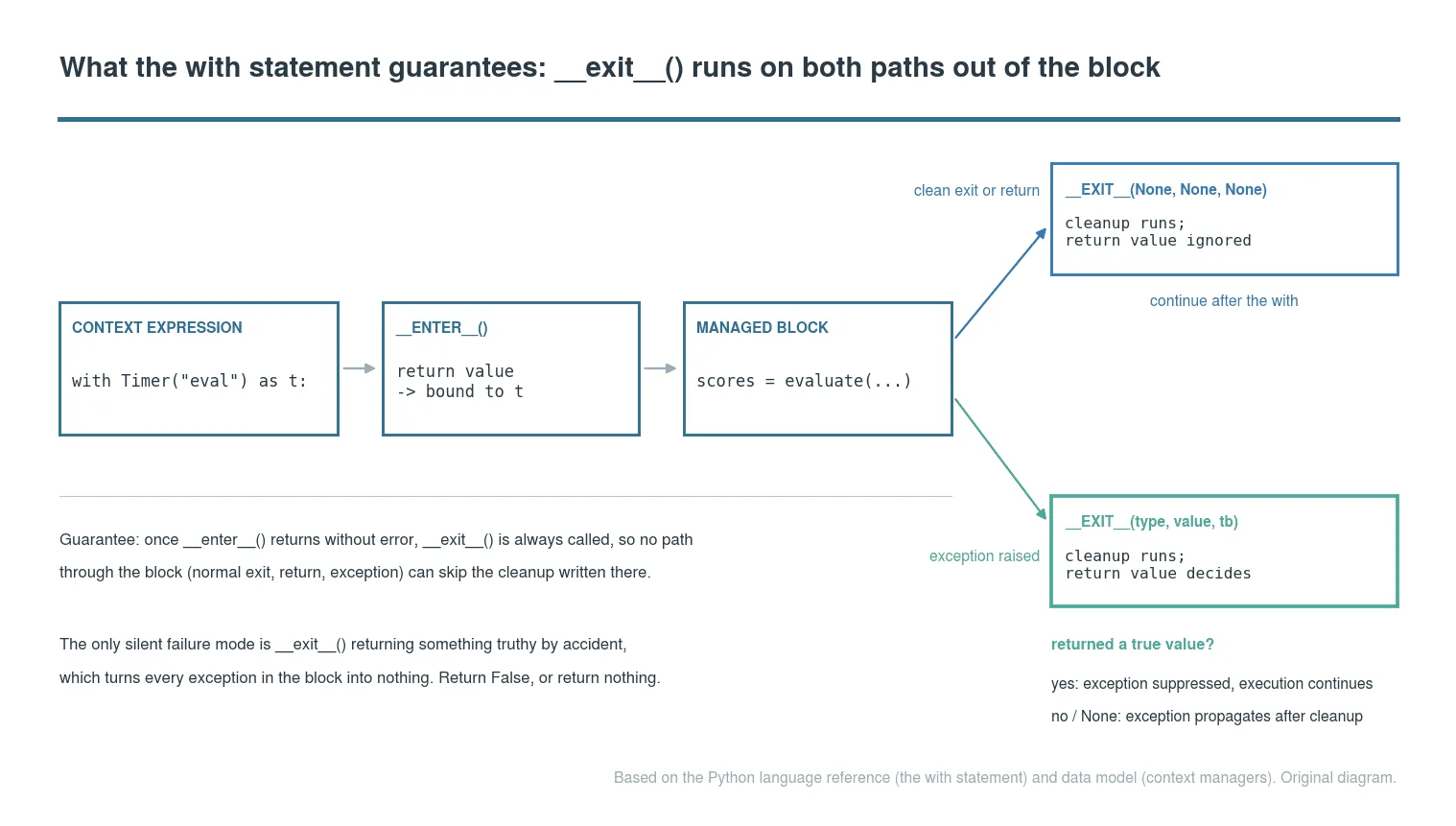
Both exits from the managed block pass through __exit__(). If the block raised an exception, that method’s return value determines whether the error reaches the caller. Credit: original diagram based on the Python language reference for the with statement and the data model.
Time work even when it fails
A timer shows why this pattern matters in practice. In a manual stopwatch, an exception can skip the second call to time.perf_counter(), leaving the operation without a recorded duration. A context manager puts that measurement in __exit__(), which runs when the block ends either way.
Here, __enter__() records the start time and returns the timer itself, making it available as t. When the block finishes, __exit__() stores the elapsed time, prints the label and duration to three decimal places, and reports whether the block completed or raised an exception. Returning False preserves the original error. The elapsed value remains available after the block.
import time

class Timer:
    def __init__(self, label):
        self.label = label
        self.elapsed = None

    def __enter__(self):
        self._start = time.perf_counter()
        return self

    def __exit__(self, exc_type, exc_value, traceback):
        self.elapsed = time.perf_counter() - self._start
        status = "failed" if exc_type else "ok"
        print(f"{self.label}: {self.elapsed:.3f}s ({status})")
        return False                   # never swallow the block's exception

with Timer("feature extraction") as t:
    features = extract(batch)

print(t.elapsed)                       # still readable after the block
The timer’s useful detail is what it does when work fails: it reports the elapsed time and labels the run failed, while letting the original exception continue to the traceback. __enter__() returns the timer, so callers can read t.elapsed after the block. __exit__() checks exc_type to choose the label, but doesn’t retain or suppress the exception. If feature extraction stops after 12.418 seconds, that number helps distinguish a slow batch transform from an early crash.
For short intervals, perf_counter() is the sensible clock: it offers the highest available resolution and, on CPython, won’t run backward. Its absolute reading has no useful meaning; only the difference between calls matters, which the class handles internally. Keep the claim modest, though. This timer measures wall-clock time for one block in one process and prints a line. That can reveal which preprocessing stage is consuming twenty minutes. It can’t make runs on different machines comparable. If you need that, reach for timeit or a profiler instead of treating extra decimal places as evidence.
Use @contextmanager for Setup and Cleanup
A class earns its keep when callers need to inspect state afterward, as with t.elapsed. For a simpler job—change a setting, run some code, then restore it—a generator wrapped with @contextmanager is easier to follow. The code before yield runs when the block begins; the code after it runs when the block ends, including when an exception leaves the block.
import logging
from contextlib import contextmanager

@contextmanager
def quiet(logger_name, level=logging.WARNING):
    logger = logging.getLogger(logger_name)
    previous = logger.level
    logger.setLevel(level)
    try:
        yield logger
    finally:
        logger.setLevel(previous)

with quiet("transformers"):
    scores = evaluate(model, eval_set)
Here, quiet temporarily changes the named logger’s level, defaulting to logging.WARNING, then restores its previous level in finally. That small guarantee is the point: even if evaluate(model, eval_set) raises, the logger setting gets put back. For a one-off setup-and-cleanup flow, that’s less machinery to maintain—and easier to audit.