Query Databricks Iceberg Tables in BigQuery Without Copying Data
BigQuery can now query Databricks-managed Apache Iceberg tables where they’re stored, giving teams a way to pair Spark-based data engineering with concurrent SQL analytics without building a copy pipeline. Google Cloud’s borderless Lakehouse reads the files Databricks writes, while BigQuery applies its query engine to them in place. The practical gain is less data movement and fewer duplicated storage paths to maintain.
Changes become visible after the Lakehouse metadata refresh, which can run as often as every five minutes. That interval is a key operational detail: the setup avoids a separate ingestion step, but it isn’t a guarantee that every Databricks write appears in BigQuery immediately.
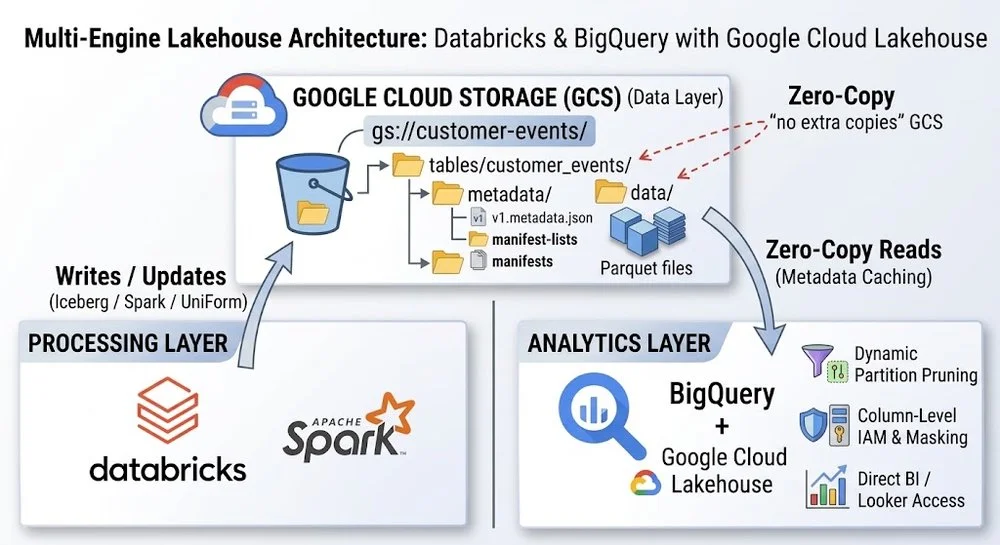
One set of files, two query environments
Databricks-managed Iceberg tables generate Iceberg-compatible metadata alongside native Delta logs. Data teams can keep Parquet files in Google Cloud Storage (GCS), with Databricks handling engineering workloads and BigQuery reading the same data through Lakehouse. That architecture separates compute from storage: teams can use each platform for its strengths without first loading another copy into BigQuery.
The catalog connection is central to how this works. Rather than hard-coding paths to table metadata, BigQuery can connect to Databricks Unity Catalog through the open Apache Iceberg REST Catalog API. When a query runs, Lakehouse asks Unity Catalog for the table’s current state. Credential vending then provides BigQuery with short-lived access to the relevant GCS data.
This lets administrators manage a federated catalog in a chosen Google Cloud location, preferably near the data. The model also extends to external storage in Amazon S3 and Azure Blob Storage. BigQuery can read open-format Parquet files in those locations without a replication pipeline. Remote-cloud egress fees still apply; Cross-Cloud Interconnect for AWS and Lakehouse caching can help reduce their impact.
Query planning depends on Iceberg metadata
Iceberg manifests help BigQuery identify which files could contain records that match a query. A filter in a standard WHERE clause can let the engine skip irrelevant partitions and Parquet files before scanning their contents. Filters that compare partition columns with literal values give pruning a clear basis for excluding data.
Iceberg’s hidden partitioning also means queries can filter on logical columns, such as timestamps, without relying on the underlying directory structure. Databricks-managed Iceberg tables don’t support partition transforms, however; Databricks recommends liquid clustering instead. Teams should account for that limitation when designing table layouts and query patterns.
Because BigQuery reads Iceberg manifests when it plans each query, it doesn’t require a metadata cache for these tables. Lakehouse caching, currently in Preview, serves a different purpose for cross-cloud sources: it can keep retrieved data blocks in Google Cloud so repeated queries against sources such as S3 can read cached data locally. Metadata-based pruning still determines which files a query needs.
Governance stays in BigQuery’s access layer
Federating storage and catalogs raises a practical question: how should user access be controlled across platforms? Lakehouse uses delegated access through a BigQuery Cloud Resource Connection associated with a service account that has the required GCS IAM permissions. Administrators can grant users access to the Lakehouse table entity and apply BigQuery controls, including row-level and column-level security and dynamic data masking, to external Iceberg tables.
Databricks can continue to handle ingestion while BigQuery governs what its users can see through its own controls. That division makes the connection useful for organizations that want cross-platform queries without asking every analyst to manage direct access to cloud storage.
File maintenance remains part of the design
Zero-copy access doesn’t eliminate storage upkeep. Frequent writes, streaming jobs and continuous ingestion can leave tables with thousands of small Parquet files. BigQuery then has to open many files and process their metadata, adding work that can blunt the benefit of vectorized query execution.
Databricks offers compaction tools to merge small files into larger ones. Teams can run OPTIMIZE on Databricks tables, or use Iceberg’s rewrite_data_files procedure for tables managed outside Databricks. The source examples show a binpack strategy targeting 268,435,456-byte files, with 67,108,864 bytes as the minimum file size. Compaction can create files in the 256–512 MB range, which can improve scan throughput; other sorting strategies can arrange data around selected columns.
-- Run on Databricks to compact small files
-- On Databricks:
OPTIMIZE customer_events;
-- For Iceberg tables you manage outside Databricks:
CALL my_catalog.system.rewrite_data_files(
  table => 'default.customer_events',
  strategy => 'binpack',
  options => map(
    'target-file-size-bytes',
    '268435456',
    'min-file-size-bytes',
    '67108864'
  )
);
Table cleanup matters too. Updates and compaction create new Iceberg snapshots, while files no longer referenced by active table states can remain in storage. Those files may support time-travel queries, but retaining them indefinitely can increase GCS costs. Databricks’ VACUUM command removes eligible unreferenced files.
ALTER TABLE customer_events SET TBLPROPERTIES ('delta.deletedFileRetentionDuration' = '7 days');
VACUUM customer_events FULL;
The stated seven-day retention period gives active analytical jobs time to finish and preserves a recovery window before deleted files are removed. Teams can schedule routine cleanup or use Predictive Optimization. They should treat retention settings as part of the table’s recovery and query requirements, rather than as a storage-only tuning choice.
A federation model with operational tradeoffs
Pairing Databricks Iceberg tables with BigQuery gives data teams a route to shared analytics while keeping files in their existing storage location. The approach relies on open Iceberg metadata, Unity Catalog federation, temporary credentials and BigQuery’s ability to prune files during query planning. For cross-cloud data, egress costs and the Preview status of Lakehouse caching remain relevant considerations.
For teams evaluating the architecture, the core decision is whether their table format, refresh expectations, access model and maintenance practices fit this federated workflow. Regular compaction and snapshot cleanup will still shape query speed and storage use. Google Cloud’s setup documentation is available here.