Google Cloud Spend Caps Add API Controls, Live Cost Reports and Monthly Resets
Spend caps become easier to manage at scale
Google Cloud’s spend caps are now generally available, giving teams a way to stop eligible usage when a project crosses a budget threshold while keeping its resources intact. The release adds API controls, faster cost reporting and automatic monthly resets—changes that make spend caps easier to operate across large environments. The distinction matters: a cap can interrupt selected usage without deleting the project or its underlying resources, giving operators a way to contain costs while preserving the setup they may need to investigate or resume work.
Spend caps are a form of enforcement, not simply an alert. They’re intended to stop eligible requests after a threshold is breached, so setting one involves a judgment about which services can tolerate a pause and which work depends on uninterrupted access. That makes the new controls most useful when teams already understand the workloads they’re protecting.
Three changes to day-to-day cost controls
The new spend caps API is available through the Cloud Billing Budgets API. Teams can create, update, lift or delete caps programmatically for eligible services in individual projects. That makes it possible to apply a guardrail as soon as a developer creates a sandbox, instead of relying on someone to configure it by hand. It also gives teams a path to include cap management in deployment workflows, where project setup and its cost controls can be handled together.
Automation can reduce the chance that a new project runs without a limit simply because a manual step was missed. It doesn’t remove the need to choose a sensible threshold or check which services the cap covers. If you’re working in this space, the useful question is whether your project creation process can apply a cap consistently, and whether someone owns the decision when that cap needs changing.
Cost visibility has also caught up with enforcement. For AI services, a cap can trigger within minutes based on estimated live costs. Those estimates now appear in Cost Reports, so teams can inspect the figures behind an enforcement event without waiting for standard billing data to settle. The faster view gives operators a more timely starting point for tracing which usage pushed a project over its limit.
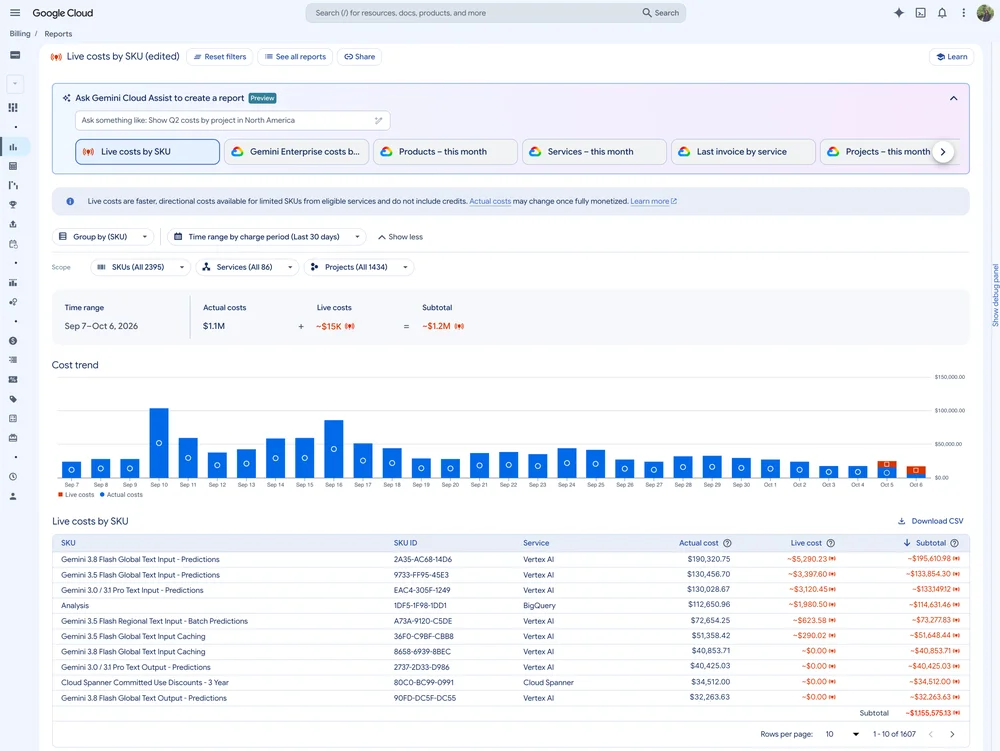
That timing can help teams investigate an interruption while the relevant activity is still fresh. But estimated live costs are still estimates, and a report is a starting point for diagnosis rather than an automatic explanation of what happened. Operators will still need to connect the cost signal to the workload and service that produced it.
Monthly resets address another operational wrinkle: previously, a triggered cap continued blocking usage until someone lifted it in the console. Now, enforced caps reset automatically at the start of each month, allowing blocked services to resume. Organizations that require a manual review before restoring service can still use the existing manual override.
The reset changes the rhythm of enforcement. A cap no longer necessarily means a service stays blocked until an administrator notices and intervenes; it can recover on the monthly cycle. That’s convenient for workloads that can pause and resume, but teams should understand when the reset occurs and whether automatic restoration fits their operating process. The manual override remains useful when a monthly reset alone isn’t enough to meet an organization’s review needs.
Set caps where interruptions are manageable
Google recommends starting with non-production workloads, such as developer sandboxes, test clusters and experimental AI agent environments. Low-dollar limits in these settings can expose unexpected usage while keeping the impact of a block contained. These workloads are also a practical place to learn how a cap behaves before applying the same approach to projects where a pause would affect a customer-facing service or a time-sensitive task.
The numbers here are underwhelming as a standalone signal: a threshold tells a team when spending crossed a line, but it doesn’t say whether that spending was wasteful, expected or tied to useful work. The value comes from pairing the limit with enough context to decide what action makes sense. A low cap may reveal runaway experimentation; it may also interrupt a workload that was doing exactly what its owner intended.
Default notifications go to billing administrators and project owners when spending reaches 50%, 80% and 100% of a cap. Teams should check that those roles reach the people responsible for responding; spend cap permissions can also be assigned through custom roles. Notifications are only useful if someone can interpret them and act, particularly when several projects have different owners or escalation paths.
There’s a capacity distinction to account for when setting expectations. Caps stop pay-as-you-go requests and requests covered by Committed Use Discounts once the threshold is reached. Provisioned Throughput is not stopped, so requests served by reserved capacity continue running.
That difference can affect how complete a cap appears to be. A team may see eligible usage pause while requests using Provisioned Throughput continue, because the cap doesn’t stop that reserved capacity. (And this is the part most people overlook.) The cap’s threshold and the capacity type behind a request both matter when estimating what will happen after enforcement.
Pair detection with enforcement
Spend caps handle enforcement, while Google Cloud’s Early Anomalies Detection looks for emerging cost changes. The two features form a practical sequence: anomaly detection analyzes early cost signals daily and can identify the SKU driving a trend; a spend cap can then pause eligible usage for a project and service after its budget is breached. Google’s earlier blog post explains the combined approach.
The tools address different parts of the response. Anomaly detection can help point to a changing cost pattern, while a cap can enforce a boundary once the budget threshold is crossed. That’s a useful pairing, but it doesn’t make cost management automatic: teams still need to decide which signals deserve investigation and which services can be paused without causing avoidable disruption.
What the release means for operations
This is more significant than it looks for teams managing many projects, because programmatic setup and predictable resets can make a cost control easier to repeat. The practical payoff will depend on the quality of the surrounding process: who sets thresholds, who receives notifications, and who can lift a cap when usage needs to resume. A control that’s easy to apply can still create confusion if its ownership and scope aren’t clear.
Teams can configure a cap from the Budgets and Alerts page in the Google Cloud Billing Console. The spend caps documentation covers setup, while the API guide describes how to add caps to deployment workflows. The operational payoff will depend on matching each cap to the services and capacity a team can safely pause.
For teams testing the feature, a contained project offers a way to check how reporting, notifications and enforcement fit together before broader use. Then they can decide whether monthly restoration is appropriate or whether the manual override better fits their review process. The guardrail is only as useful as those choices. A pause, an alert, a reset.