MCP Server Security: Essential Controls for Enterprise AI Deployments
Model Context Protocol (MCP) gives AI applications a standard way to reach tools such as databases, file shares and customer relationship management systems. That convenience makes MCP security an early architecture decision: a host connected to multiple servers can give an AI application useful reach, while also creating more paths for misuse or compromise.
That decision often lands with security teams after an organization has already approved its first large language model (LLM) application. The practical response is to set minimum controls while the implementation is still taking shape. A risk assessment can help teams prioritize them without turning security review into an open-ended delay.
MCP standardizes connections, not risk
The protocol’s role is comparable to ODBC, the database connectivity standard that let applications communicate with different databases through a common interface. With MCP, an AI application communicates with an MCP host using standardized methods. MCP servers then translate requests for particular tools into the format those tools use.
That shared interface can simplify integration: an application can work with different endpoints through their MCP servers rather than relying on custom connections for each one. But standardization doesn’t determine what a tool is allowed to do, which users can reach it, or how requests and responses are checked. Those decisions remain part of the organization’s design and security work.
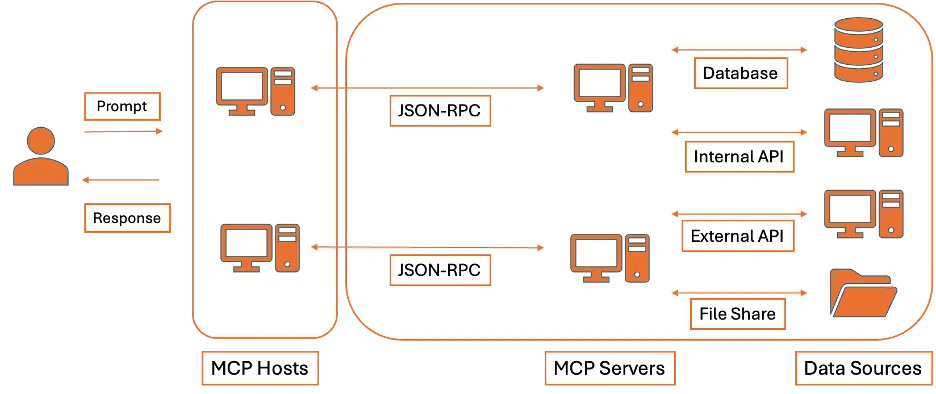
Fig.1 – MCP architecture.
Greg Neville
MCP hosts sit within the organization’s environment, where network traffic entering and leaving each host can be controlled. A single host may connect to multiple MCP servers. That can make a deployment easier to extend, but it also concentrates access: a weakness in the host or its permissions could expose several connected tools.
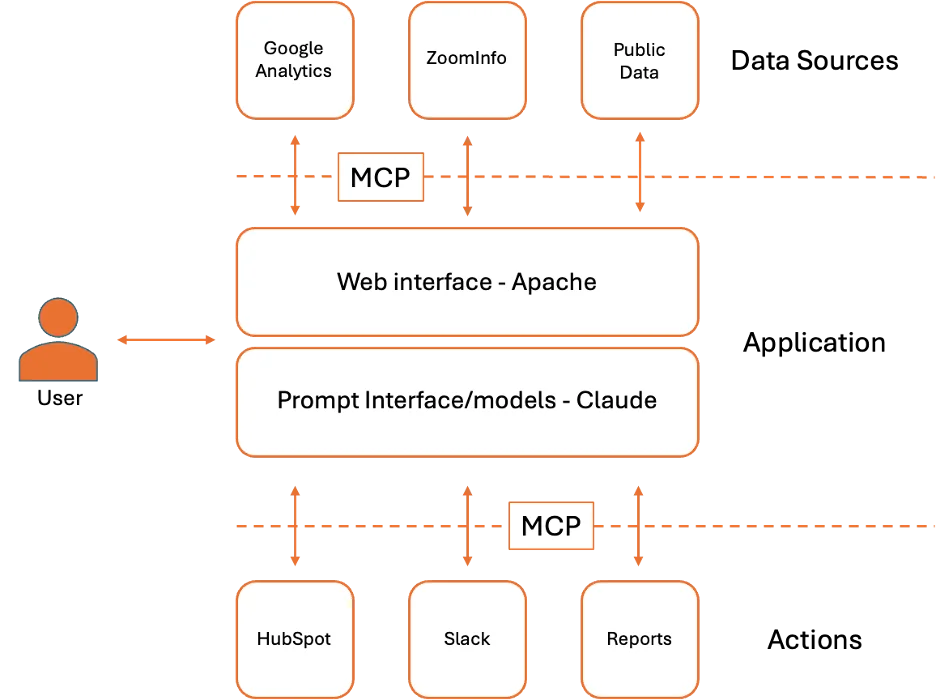
Fig. 2 – Example marketing LLM application.
Greg Neville
Set boundaries around data and actions
Start by treating content from external or indirect sources as untrusted. Validate and sanitize inputs before an LLM application or connected tool acts on them. Relevant checks include authentication and authorization, screening for malicious code or jailbreak attempts, and filtering sensitive or regulated information. These controls should reflect the data and tools the application can actually reach.
Responses need their own checks. Requiring a defined structure can make outputs easier to validate; context-aware encoding and removal of unexpected or unapproved data can reduce the chance that a response causes harm downstream. For high-impact results, such as financial reporting, human review can catch errors or questionable content before it is used.
Keep permissions narrow. Give each server access only to the users, tenants and workloads it needs to serve, and grant each tool only the capabilities required for its task. Splitting tools with different access needs across multiple MCP servers can help avoid broad permissions being bundled together. Short-lived tokens also reduce the time available to misuse a stolen credential.
Tool selection is another boundary. An MCP host doesn’t need every available capability enabled. Limit its tool set and each tool’s permissions to the minimum needed for the application. This makes the consequences of a faulty request or compromised component easier to contain.
Protect the infrastructure and its connections
Network segmentation can narrow the routes available to an MCP host. Restrict incoming and outgoing traffic to approved systems and ports, and verify those rules rather than relying on the intended design. This limits unnecessary connectivity if a host or application behaves unexpectedly.
Harden the host according to an established baseline, such as the CIS Benchmarks. Disable unused or default accounts, close ports the service doesn’t need, and adjust system settings to reduce exposure. Infrastructure-as-code (IaC) can make deployment settings repeatable; using it to create ephemeral servers can also limit how long a compromised instance remains in service.
Encryption deserves explicit attention in the design. Protect data both at rest and in transit, and manage encryption keys carefully. A general server-hardening checklist may cover some of this work, but teams should verify that encryption applies across the full path between the application, host, server and connected service.
For third-party providers, review independent assessments such as SOC 2, HITRUST or ISO 27001/2, and put required controls into contracts. If an assessment identifies a high-risk gap, document how and when the provider will address it. Where protected health information is involved, the source recommends putting a Business Associate Agreement in place.
Make oversight and testing part of delivery
Detailed logs of prompts and AI actions help teams investigate hacking attempts, misuse and prompt abuse. Logging should capture the events needed to understand what the application requested and what actions followed. Human approval should be required before high-risk actions, such as administrative changes to critical systems, are executed. The same review can apply to sensitive or high-impact outputs.
Before production, test whether controls work in practice. Use synthetic examples of sensitive data relevant to the environment, including fake protected health information (PHI), Social Security numbers or account numbers, to check whether the application flags or blocks them. Test authentication by checking which tools users can see and access. Confirm that network filters allow only approved systems, host configurations meet the hardening policy, and critical events are recorded.
These checks turn requirements into observable results. If a control fails, the team has a specific gap to resolve before deployment, rather than an assumption that a policy or configuration is working.
Prioritize risk in terms leaders can act on
Security teams may need support from executives when project schedules don’t reflect the controls the deployment needs. A risk committee can help weigh requirements and agree on timelines, while allowing teams to prioritize the controls that reduce the most significant exposure first.
An AI risk assessment can map relevant threats to the organization’s systems, estimate inherent risk and record what remains after controls are applied. The OWASP Top 10 for LLM Applications is one source for building a threat list. Teams can tailor that list to their environment and set aside threats assessed as very low or low likelihood during an initial pass.
For decision-makers, describe consequences in operational terms: lost productivity, downtime, weakened customer trust, regulatory fines, or impacts specific to the organization. Depending on the business, those effects could include patient care, trading errors, credit decisions, claims and underwriting, worker safety or service availability. Qualitative ratings can be useful when the reasoning behind them is clear and defensible.
The practical takeaway is to treat MCP access as part of the AI application’s security boundary from its first design phase. Define what the host can reach, what each tool can do, which inputs and outputs need screening, and where a person must approve an action. Then test those decisions before the application reaches production.